DeepSeek Local: Running Enterprise-Grade LLMs Without the Cloud Tax

For the full source referenced in this article visit: https://github.com/cschladetsch/PyDeepSeekLocalCodeAssist
Every time you send a prompt to ChatGPT, you're trusting OpenAI with your data. For most use cases, that's fine. For regulated industries, proprietary codebases, or anyone who's read a privacy policy lately, it's not.
PyDeepseekLocal solves this by giving you a complete local LLM runtime: a Python-based Gradio interface, file uploads that never leave your machine, and an installer that handles the messy parts of model provisioning. It's not a demo, it's a functional toolkit for running large language models on your own hardware.
This article walks through the project's architecture, performance characteristics, and design decisions. If you've been waiting for a practical way to run DeepSeek locally without reconstructing the entire ML infrastructure stack, this is it.
What You Get
The repository provides five core components:
- A Gradio web interface for conversational interaction with local LLMs
- A file upload pipeline that injects document contents into prompts without network round-trips
- A model loader supporting GPU acceleration and 4-bit quantization
- Startup scripts for localhost or LAN deployment
- An installer that provisions dependencies, downloads models, and configures the runtime environment
The central executable is deepseek_repl.py, implementing both the Gradio UI and model runtime. The install and start scripts (install_deepseek.sh, start_deepseek.sh, start_deepseek_network.sh) handle setup and launch. Most local-LLM guides are fragmented—pure Jupyter notebooks, opaque Docker recipes, or tutorials assuming you understand CUDA build chains. This project collapses those pieces into a cohesive CLI + UI experience.
Architecture
The user interacts with a Gradio web app, which sits atop a model loader (Transformers + PyTorch) and file processor. Everything executes on the local machine:
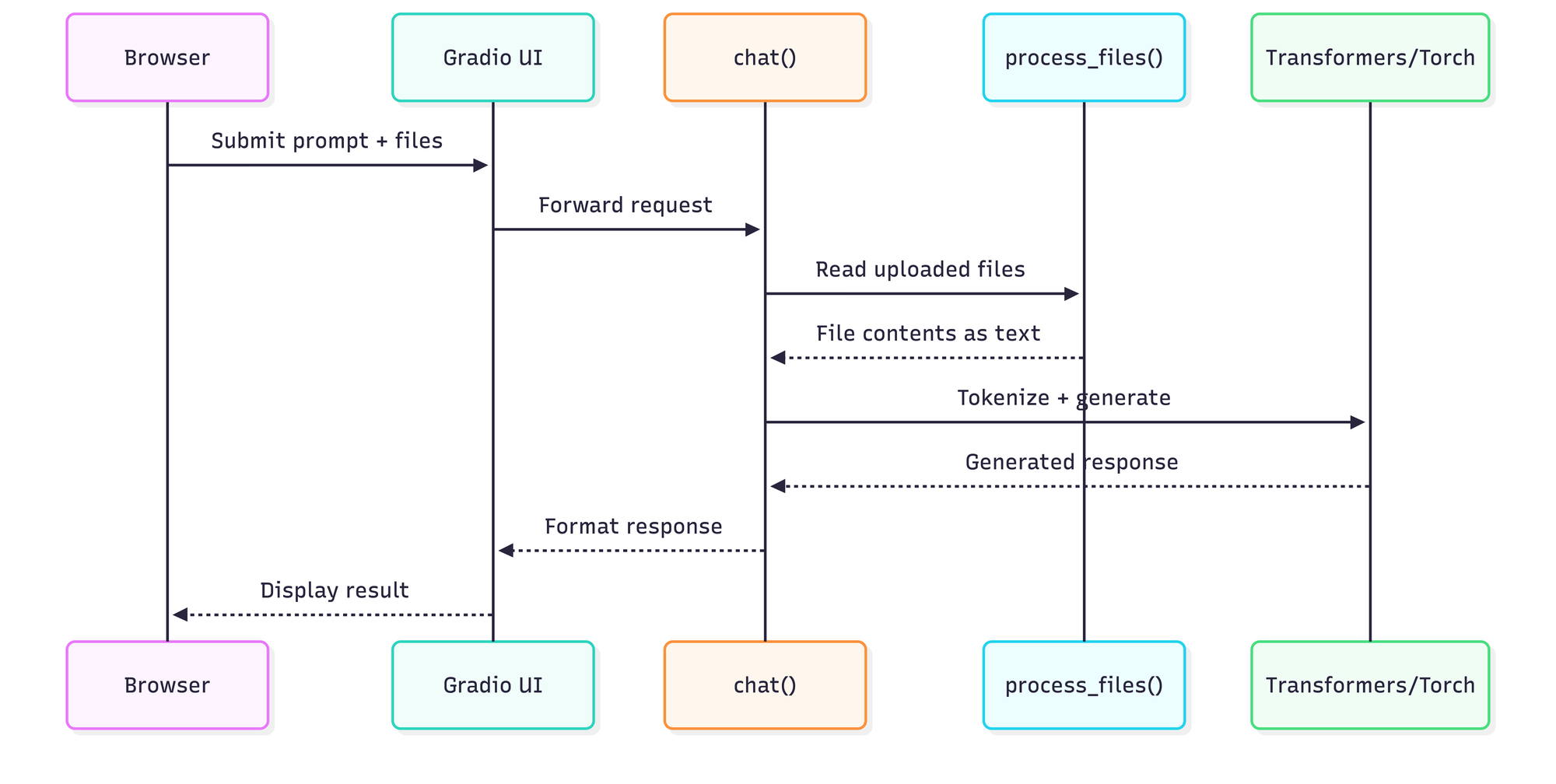
This sequence maps directly to the code path in deepseek_repl.py. The chat() function acts as the hub: it aggregates user prompts, optionally processes uploaded files into text context, feeds the combined prompt into the model, and returns generated responses to the Gradio UI.
Context Injection: How it Works
The chat() function handles the heavy lifting of merging your files with your query. Before the prompt reaches the model, the system processes any uploaded files into a text blob. Here is a conceptual look at how that injection is handled:
def chat(message, history, uploaded_files):
    # 1. Process files into context string
    context = process_files(uploaded_files)

    # 2. Append context to the user message
    full_prompt = f"Context:\n{context}\n\nUser: {message}"

    # 3. Tokenize and generate via Transformers
    # ... generation logic ...
The architecture is intentionally simple—there's no message queue, no microservices, no abstraction layers. Request comes in, inference runs, response goes out.
The Installer: Infrastructure as Bash
The install_deepseek.sh script handles more than dependency installation. It performs system validation (Python version, disk space, RAM), provisions a Python virtual environment, installs PyTorch with CUDA support detection, downloads models from Hugging Face via Git LFS, manages authentication tokens for gated models, and generates runtime scripts. It's not a convenience wrapper—it's a full provisioning system.
The script supports multiple operation modes: small model installation, model enumeration, cleanup, and uninstall. That single-script-many-paths design makes it accessible for users who aren't comfortable assembling ML environments by hand. For reference, a complete install on a clean Ubuntu 22.04 system with an RTX 3060 (12GB VRAM) takes approximately 15 minutes for dependencies plus model download time. The DeepSeek-Coder-6.7B model weighs in at roughly 13GB, so budget for that on metered connections.
Model Loading and Quantization Strategy
The runtime uses Hugging Face Transformers and PyTorch to load models from the local models/ directory. The GPU path attempts 4-bit quantization via BitsAndBytesConfig from the bitsandbytes library when CUDA is available.
Why 4-bit specifically? The quantization reduces memory footprint by 75% compared to full precision (FP32) with minimal quality degradation. A 7B parameter model that would consume 28GB in FP32 drops to roughly 7GB in 4-bit, making it viable on consumer GPUs.
Hardware Performance Benchmarks
Based on the default 7B model and 4-bit quantization, here are the expected performance tiers:
| Hardware Configuration | Inference Speed | VRAM/RAM Usage |
|---|---|---|
| RTX 4090 (24GB) | 40-60 tokens/sec | ~7GB (4-bit) |
| RTX 3060 (12GB) | 15-25 tokens/sec | ~7GB (4-bit) |
| Modern CPU (Ryzen/Intel) | 2-5 tokens/sec | Uses System RAM |
File Uploads: Local Context Injection
The process_files() function reads uploaded files into a text blob that becomes part of the prompt. It attempts UTF-8 decoding and, on failure, includes metadata about binary files (images, PDFs) without content extraction. This makes the UI feel like a workspace rather than just a chatbox.
Because everything happens on-device, files and queries never leave your computer. This isn't marketing—it's architecturally enforced. There's no network call that could leak data, no telemetry endpoint, no "phone home" mechanism.
Startup Scripts: Localhost vs. LAN
Two start scripts handle different deployment scenarios:
start_deepseek.sh: Binds to127.0.0.1for local-only access.start_deepseek_network.sh: Binds to0.0.0.0or a custom IP for LAN access.
Quick-Start Checklist
- Clone the Repo:
git clone https://github.com/cschladetsch/PyDeepseekLocal - Run the Installer: Execute
bash install_deepseek.sh. This handles dependencies and the ~13GB model download. - Verify Configuration: Check
model_info.txtto confirm your active quantization settings. - Launch: Run
bash start_deepseek.shand open the local URL in your browser.
Final Assessment
PyDeepseekLocal demonstrates what local AI tooling should feel like: simple, explicit, and respectful of user privacy. It doesn't hide complexity under magical abstractions—it scripts the complexity into a predictable workflow.
Unlike Ollama's black-box approach or text-generation-webui's sprawling feature set, this project stays focused. You get a working Gradio interface, reliable model loading with sensible fallbacks, and file upload integration.
The repository is MIT licensed. You can fork it, extend it, or deploy it commercially without restriction.

About the Author
Christian Schladetsch is a Principal C++ Engineer with 30 years of systems programming experience, currently exploring the intersection of traditional software engineering and local AI deployment.